 preen
preen
What preen is
preen renders markdown and diffs in your terminal, without opening an editor.
Birds preen to tidy their feathers. You preen your diff before you commit.

It is a single bash script and nothing else. There is no daemon, no binary and no plugin manager — the work is done by three tools that are already very good at their jobs:
| job | tool |
|---|---|
| render markdown | glow (3.0 or newer) |
| render diffs | delta |
| file navigation | fzf |
preen picks the right one for what you gave it, wires them to a shared
color theme, and puts a file picker in front. That is the whole idea.
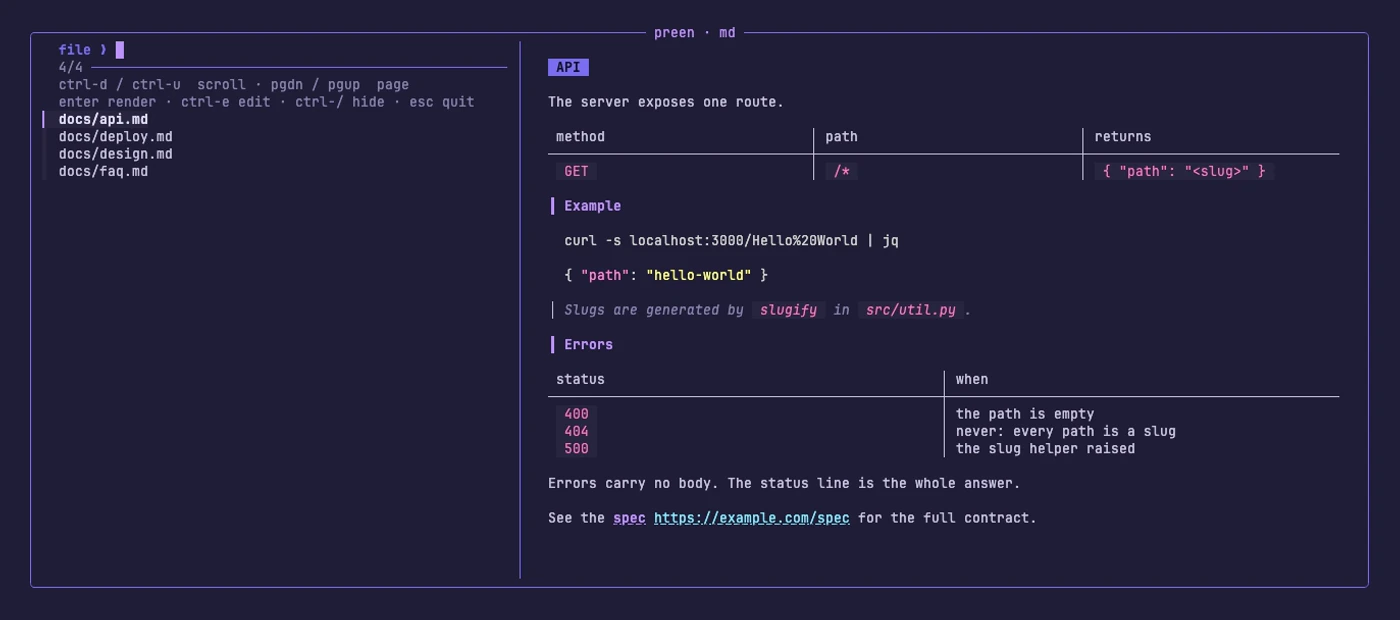
Markdown mode, same keys:
Requirements
bashgit, for every mode except plain markdown browsingglow3.0 or newer,deltaandfzf— the installer fetches whichever are missing- macOS or Linux
- Optional:
gh, only forpreen pr
glow must be version 3. Version 2 throws away all color when its output is
not a terminal, and fzf hands every preview a pipe — so on glow 2 each preview
came out gray. The installer upgrades anything older.
Install
curl -fsSL https://raw.githubusercontent.com/beatzball/preen/main/install.sh | bash
That clones preen to ~/.local/share/preen and links preen into
~/.local/bin.
Prefer to read it before running it? Clone first and run the installer out of the checkout — it behaves the same either way:
gh repo clone beatzball/preen && ./preen/install.sh
The installer is safe to run again. It does seven things, in this order:
- clones the repo, if it is not already running from a checkout
- installs
glow,deltaandfzfif they are missing - copies
themes/glow-roost.jsonto~/.config/glow/roost.json - writes the delta theme into
~/.gitconfig, backed up first, once - registers the
git preenalias and thepreendifftool - links
bin/preeninto~/.local/bin - tells you if that directory is not on your
PATH
Steps 3 to 5 are covered in Theming and Git integration.
Options
| flag | effect |
|---|---|
--dry-run | print every step, change nothing |
--no-deps | config only, install no packages |
--user | always fetch tools into the prefix, never use sudo |
--dir DIR | clone preen somewhere else (default ~/.local/share/preen) |
--prefix DIR | where preen is linked, and where any tool it has to fetch goes (default ~/.local/bin) |
--uninstall | undo the theme, the git alias, the difftool, the link and the config |
Which package manager it uses
It uses whichever of brew, apt-get, dnf, pacman, zypper or apk it
finds. If your package manager has no package for one of the three tools, it
falls back to that tool's official GitHub release tarball and drops the binary
in the prefix — ~/.local/bin unless you passed --prefix. No sudo is
needed for that fallback path.
Uninstalling
./install.sh --uninstall
That removes:
- the
delta.*theme keys it wrote, plusalias.preen,diff.tool,difftool.preen.cmdanddifftool.prompt ~/.config/glow/roost.json, the glow style- the
preenlink in your prefix
It deliberately keeps core.pager, interactive.diffFilter,
delta.navigate and delta.dark, because those are a plain delta setup rather
than anything preen added. It never removes packages, and it leaves
~/.gitconfig.preen.bak — your pre-preen config — for you to delete.
Details in Git integration.
First run
cd some-repo-with-changes
preen
With no arguments, preen looks at where you are: inside a git work tree it
opens the diff browser, and anywhere else it browses markdown. Nothing to
configure.
The full command list:
preen                 # auto: diffs in a git repo, else markdown
preen md [DIR]        # browse markdown files under DIR (default .)
preen diff [REV]      # browse files changed vs REV (default: working tree)
preen pr [NUMBER]     # browse the files in a GitHub PR (default: this branch)
preen worktrees       # pick a git worktree, then browse what it changed
preen wt              # short for the same
preen FILE.md         # render one file and quit
preen --help
ctrl-c gets you out of any of them. So does esc, with one exception: in
worktrees mode esc goes back to the worktree list rather
than quitting.
Where to go next
- Browsing — the picker, the keys, and the layout toggle
- Pipes —
git diff | preen, and how it guesses the renderer - Pull requests — review a PR without checking it out
- Worktrees — see what an agent changed
- Git integration —
git preenandgit difftool - Theming — the colors, and how to change them